
Your personal referral link
Every Ambassador has a personal referral link. It opens our referral form with your referral code already filled in, so the businesses you send us are linked to your account. You open it with Refer a partner, at the top of the menu and on your Dashboard.
Important: Only a form sent through your referral link carries your code. If a business contacts us another way, or a form reaches us without your code, we cannot link it to you and no commission is paid.
How to refer a business
- Log in to your Ambassador portal and click Refer a partner. The referral form opens in a new tab.
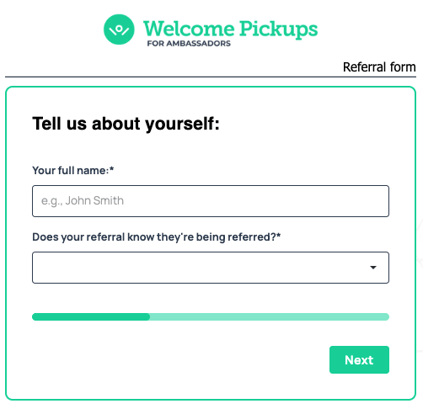
- About you: enter your full name and confirm that the business knows you are referring it.
- The contact person: enter their first name, last name and business email. A phone number is optional.
- The business: choose its type (hotel, vacation rental, travel agency or company account) and add its name and country. For hotels and vacation rentals, also add the property details the form asks for.
- Click Submit referral.
Send each business once, and before it makes its first booking with Welcome Pickups. A business that has already booked with us does not count.
Before you send a referral: make sure the contact person knows you are referring them and agrees to hear from us.
What happens next
- Your referral appears in your portal under My Referrals within about two hours, as In progress.
- Our Partnerships team contacts the business. We decide whether to work with each business.
- When the business books its first transfer, its status changes to Became a partner and your first-transfer bonus is added under Rewards. For hotels and vacation rentals, this happens once we have set the cluster.
- If the referral does not qualify, it shows as Not eligible for rewards. See Who can you refer?.
Keep your link for businesses you know
Your referral link is for businesses you know personally or through work. Do not post it on websites, social media or coupon sites, and do not share it with other Ambassadors. If more than one Ambassador refers the same business, only the first valid referral counts.
Read the Program rules to see what you can and cannot do when you refer.
Still have questions? We're just an email away: ambassadors@welcomepickups.com